Thursday, June 26, 2014

Saepta - Ask.Vote.Share.

I have been spending most of my time recently working at a software company that has just gone live with a new voting application. The company is called Saepta. It is an easy to use software voting application that is free for all users and makes it ridiculously easy to ask a question, vote on a question, view the results of the voting as it occurs in real-time, and also allows you to easily share the vote box with all of it's inherent fuctionality in social media platforms like Facebook, Google Plus, Linked-in, Pinterest, and any web site or blog. The Saepta voting box that you see below just took me about a few seconds to embed in this blog and is a live application meaning you can vote, post a comment, and view the voting results directly from the Saepta embedded voting box.

Please take a moment to check it out. Vote, comment, go to our main web site www.saepta.com to vote or post your own questions. Would love to get your feedback on this cool new software application.


Monday, April 14, 2014

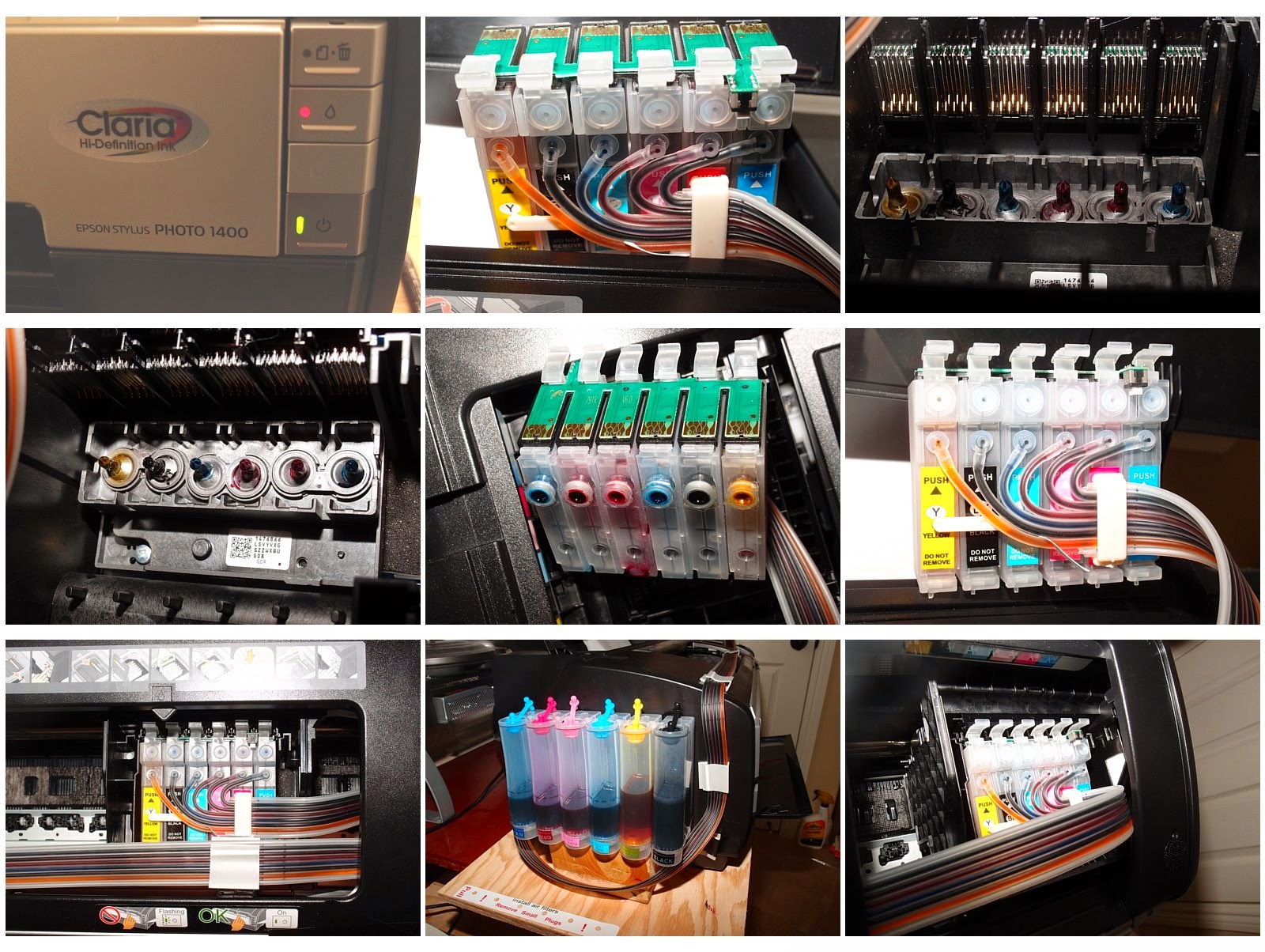
High Quality Photo Printing at The Lowest Per Page Cost Epson 1430 Artisan Ink Jet CIS System


Photo Printing High Quality and Lowest Cost
Achieving The Lowest Page Cost
With a CIS (Continuous Ink System) and the 

Epson Artisan 1430 Ink Jet Printer
Producing photo quality prints in the comfort of your own home or home office in a
cost effective manner has until recently been impossible to do until recent
developments on the CIS (continuous ink system) front came to market to
overcome many of the shortcomings and defects of the current generation
of CIS systems currently available for Epson Inkjet Photo printers. Reliability
and consistent ink quality issues are no longer a concern as the ink clogging
problem has been resolved with the introduction of polyethylene tubing
which is resistant to ink clogs and provides a reliable ink delivery system
that prevents ink clogs and ensures long reliable print head life on
Epson Photo Inkjet printers. 99% of the other CIS systems use PVC
ink supply hoses which deteriorate over time and cause the ink jet
to clog frequently. When installed on the Epson Artisan 1430 wide
carriage Photo Printer, you can print a  13” x 19” glossy photo print
for about .50 Cents total ink cost. The average ink cost per print
when using Epson Claria Print cartridges averages between $4.75
and $5.50 per print. Printing a 13” x 19” Color Photo for 1/10th the
ink cost is a significant cost savings no matter how you look at it.
Factor in the printer reliability, colorfast ink properties UV ray
resistance and color fidelity consistency and you have a truly affordable
 photo printer printing system that starts paying for itself immediately.
You will save over $1,000.00 in net ink costs after printing the first
200 13” x 19” photos.


I have spent many months researching CIS Continuous Ink Systems
designed specifically for the Epson Artisan 1430 printer. After much
trial and error, I have found the best CIS system by methodically
testing and re-testing the system with different high quality ink-jet
photo paper from Epson, Canon, Kodak and HP.


If you have an interest in obtaining one of these systems for personal or
commercial business use, please contact me at weslem@aol.com.
Purchase and lease price quotations with bundled maintenance agreements 

are available upon request.


Tuesday, July 16, 2013

Netiquette IQ, The Book, The definitive guide to writing email is now available

My good friend Paul Babicki has been working on a pet project over the last 5 years or so and I am pleased to announce that he has just released his book, Nettiqette IQ.

As snail mail has rapidly phased out as a primary means of business communications, email has replaced that form of communication with the proliferation of computers and mobile devices. I have seen the deterioration of the quality of emails over time and addressing the problem of writing a proper email that is relevant to the occasion from a business or personal perspective  is a problem that Paul has tackled head-on with the formation of his web-site and blog, Webiquette IQ and the release of the follow-on book.

This is the definitive and last book you will ever need as a reference guide or even a manual on etiquette and manners for all forms of electronic communications. The timing could not be better as new generations adopt email as their primary form of communications. Maintaining courtesy, decorum and above all common sense manners on the Internet is a task that has been overlooked....until now.

Please check out the book at:

http://www.netiquetteiq.com/Netiquette_IQ_Book.aspx

The Netiquette IQ Blog is also a very helpful resource and reference point for those who want tlearn more before purchasing the book.

http://netiquetteiq.blogspot.com/

I want to extend a sincere thanks to Paul for producing this outstanding resource and for all of his efforts with helping all of us of communicate more effectively and to maintain decorum on the Internet.

Thursday, June 27, 2013

Fujitsu Lifebook UH572 Ultrabook Review

Fujitsu Lifebook UH572 Ultrabook Review - PC Notebook Review 6/27/2013
Sneaking in under the radar last year is a full featured Ultrabook notebook from Fujitsu that caught my attention  as they have been a relatively late entrant in the Ultrabook product market. My past experiences with Fujitsu notebooks has been positive overall and I have used the Fujitsu P series of sub-notebooks for many years as my primary business notebook. Fujitsu is a well-respected world-wide notebook innovator and manufacturer but spends little to no marketing and advertising dollars here in the US. They have gained a cult following on the notebook side here in the US by business travelers that are tech savvy. Fujitsu has a very well earned reputation as a tablet and ultra portable notebook manufacturer over the last 29 years or so. Their notebooks have always been priced at least 25 to 30% above competing models from Lenovo, Toshiba, Dell, Sony and HP but street prices in the US are relatively low as refurbished and clearance models can be easily found at internet resellers like J and R and B and H Photo, CDW, and PC Connection, in addition to eBay auctions of Fujitsu notebooks found on the Fujitsu eBay store-front.

This particular Ultrabook model is basically the same model as the Fujitsu U772 corporate Ultrabook model that starts at ta retail price of $1599.00. The Fujitsu UH572 Ultrabook is essentially the same design and has the same cpu and storage components as the U772 but carries an MSRP of $899.00. The only difference is that the UH572 has a 13.3" LCD LED back-lit screen instead of the 14" one that is standard on the U772.

A few weeks ago, Fry's Electronics had a special sale on these notebooks. A brand new Fujitsu UH572 Lifebook Ultrabook was on sale for the ridiculously low price of $498.00. Fujitsu also has a $100.00 direct to consumer rebate for this model notebook so the net cost is $398.00!!!!! This notebook is a fully featured Ultrabook with an Intel Core I5 3317 Ivy Bridge processor. 4 GB of RAM and a 500 GB Hard Disk with a 32 GB mSATA cache Hard Disk that supports Intel's Instant On technology. It has an internal 4200 mAH non-user removeable Lithium Polymer Battery with a rated run time of almost 6 hours, and up to 8 if an SSD drive is installed. Two USB 3.0 Ports and one powered USB port along with a built in Bluetooth radio and a standard HDMI connector make this a fully featured notebook perfect for corporate travel and presentations in the board room. It also has built in WiDi and an SD/XC memory Stick Pro Card Reader/Writer for those who are into digital photography. Windows 7 Pro 64 Bit version is the standard operating system. At a little over .66" thick, this notebook is really thin and light with a total weight of about 3.25 pounds.

First Impressions of this notebook
The keyboard has a very short travel due to the thinness but the island style keyboard provides a satisfying click when the keys are pressed and you can type accurately after a short period of time adjusting to this keyboard. There is little to no flex on the keyboard and main chassis that supports the LCD screen and ther is little to no flex on the LCD screen with a very smooth hinge system and durable black glossy aluminum finish on the trackpad and inner covers that attracts fingerprints and smudges. Cosmetics wise, this notebook looks adn feels like a premium ultrabook and the design is very understated.

Sensible upgrades transform this notebook into a powerhouse portable workstation
Of note, Fujitsu technical and product marketing documentation states the the maximum amount of memory this notebook will support is 4 GB of RAM as there are only 2 memory simm slots populated with 2 GB DDR3 SODIMM memory modules. I tried upgrading the memory to 16 GB of SystemMemory by installing 2 8GB Crucial Memory DDR3 SODIMM memory modules and they worked PERFECTLY in this notebook with no memory or system errors whatsoever. With WIndos 7 64 Bit OS installed I now have access to 16 GB of memory within a notebook that only costs $398.00.

Opting for the most batery life and getting the highest performing disk drive, I also upgraded by removing the 7 mm Hitachi 5400 rpm 500GB SATA drive and installed a Plextor 256 GB mSATA M5M SSD drive attached to a SATA to mSATA adapter. The Windows Performance rating for Disk I/O jumped from 5.9 to 7.9 and power consumption at idle is down to .1 watt. This mSATA drive currently sells for about $200.00 on Amazon and or Newegg.

This notebook is now a speed demon and I am averaging close to 8 hours of battery life on a single charge.
This premium Road Warrior is more powerful than Asus, Samsung, Acer, HP and Lenovo ultrabooks costing upwards of 1799.00. The upgrade limitations on those notebooks are well documented as 4 GB is the normal max and it is difficult to upgrade their built in mSATA SSD drives. I now have a screamingly


fast Ultrabook that gets 8 hours of battery life, has 16 GB of memory and really fast 256 GB mSATA Plextor SSD drive that comes in at $799.00 with all of the performance and memory upgrades.

Tuesday, April 30, 2013

It's All About The Sensor Size, Stupid! Advice for buying the right Digital Camera

If we take a look at the current product offerings by the major digital camera companies we are faced with a vast array of different digital camera models that are all competing for our hard earned dollars. No longer content to wait at least a year before coming out with new camera models, the choices of digital cameras available for the consumer seems to be endless and the marketing hype, feature creep and mis-information being circulated about what makes a good digital camera makes it harder than ever to decide on a model that will give the best quality digital photos. The megapixel escalation war seems to have died down, but the number of megapixels is just one factor that affects picture quality. Lens quality, the image processor and most importantly the size of the image sensor will have the biggest effect on the ultimate image quality and noise produced in low light conditions.

Yours truly has finally figured out the secret to unlocking the mystery of how to buy the best digital camera by following a very simple rule of thumb.

Buy the digital camera with the largest CMOS image sensor available your budget can afford.

Put quite simply, the larger the CMOS image sensor the digital camera has, the higher quality images that camera will be able to produce. Currently the largest size image sensor available on consumer level digital cameras and DSLRs is the APS-C size sensor. Until a few years ago, the only digital cameras that employed this size sensor are bulky DSLRs. (Digital Single Lens Reflex Cameras). These DSLR cameras weigh much averaging 20-32 ounces with the battery installed. The lenses for DSLRs are much larger and heavier as well. With a whole new generation of much smaller-bodied mirror-less compact changeable lens cameras introduced to the market by Sony in their line of NEX cameras, the APS-C sensor has been adapted for use in a camera body that weighs around 12 ounces which opens up the door for a truly compact pro-level camera that you can take any where like a point and shoot but be able to attain the quality of a much larger DSLR camera.

Wednesday, February 13, 2013

Mike's Camera - Dublin -Best East Bay Camera Store

Mike's Camera
Complete Digital Camera and
Electronic Imaging Services Company
Dublin CA

If you are looking to buy a digital camera or need professional quality enlargements done the right way, look no further than Mike's Camera in Dublin CA. Grant Peterson (Store Manager) and his friendly/knowledgeable staff will take the time to answer any questions no matter how basic or advanced they may be. They have a excellent selection of DSLRs, Bridge Digital Cameras and a wide array of Point and Shoots. They carry Nikon, Canon, Sony, Olympus, and the Panasonic Lumix line of Digital Cameras. High end DSLR cameras from Canon and Nikon are on display and you can get your hands on them and test them out in the store. They also have a wide selection of lens caps, filters and rechargeable batteries, chargers, and miscellaneous cables and memory card readers.  If they don't have a particular camera or accessory in stock, they can order it and get it shipped to you or the store pretty quickly. They also sell Kodak film as a lot of local high schools still teach traditional photography classes with the older film type 35 millimeter cameras. I have had several poster sized enlargements done and they came out great. The lamination was perfect and they are hanging in our living room and den.


The sales staff is very attentive, patient and caring.  They will respectfully listen to what you are looking for in a digital camera and will explain the pros and cons of each camera they are offering for sale careful not to oversell or bait and switch which other camera retailers are guilty of doing. I really like this camera store because it offers old fashioned customer service with reasonable prices and you get to pick their brains for advice on taking better digital photos. They also offer beginner, intermediate and advanced digital photography classes that are all reasonable priced. This is one of the few camera stores that allows you to try out the camera and accessories before making your purchase. This is a huge advantage over the big box stores like Best Buy, Walmart and Target.


This is a full service photography dealer specializing in the following products and services:
  • Digital Cameras
  • Weatherproof/WaterProof Shock Resistant Digital Cameras, Digital Photo Frames, Photo Paper and Mounting Accessories, Laminating Scrapbook Accessorie
  • Digital Imaging, enlargement and Finishing Services
  • Photo Scrap Books
  • Batteries, Lens Filters, Lens Caps, USB Cables, Power Cables, AC Adapters
  • Camera Bags - Small Medium Large and BackPacks, Day Bags,
  • Tripods
  • Shoe Mount Flashes
  • Umbrellas and Flash Accessories
  • Kodak 35 MM Film both Color and Black and White
  • Shoulder straps, Gear Bags, Remote Release Cables
  • Memory Cards, SD-HC Compact  Flash, XD and Sony memory Sticks
  • Memory Card Readers
  • Wide Angle Lenses
  • Zoom Lenses
  • Waterproof Digital Cameras (Olympus)
  • Instructional Books & DVDs for most popular DSLR Cameras
  • Binoculars
  • Picture Frames - Regular and Digital
  • Photo Books
  • Lamination Film

If you want to improve your digital photography skills, upgrade to the latest and greatest camera, or need an accessory Mike's Camera in Dublin will provide the one-stop shopping experience without having to make the schlep into San Francisco or having to order it on line and wait for it to be delivered as Mike's will most likely have what you want in stock. I highly recommended this store and you will see how the staff and customer service makes all the difference in the world.

Mike's Camera - Grant Peterson, Store Manager
7192 Regional Street
(Between Amador Valley Blvd and Dublin Boulevard)
Dublin CA 94568
925-829-3670

Wednesday, December 12, 2012

Reducing Your Electric Bill - A Systemic Non-Solar Approach

Having resided in some of the most expensive electricity regions of the country (New York, Honolulu, San Francisco) I have spent a lot of time researching ways to reduce electricity consumption as a way to reduce our electric bill without having to resort to installing an expensive roof solar panel generation system. A recent move to a 4800 square foot house also prompted me to step up my efforts to develop this electricity reduction plan as we realized that we would have to budget for a huge monthly electric bill.

We discovered that our neighbors in similarly sized homes on our street were averaging about $285.00 to $450.00 per month on PG and E monthly electric bills. I estimated that the baseline monthly electricity cost average to be about $350.00 per month factoring Air Conditioning use. I then set a goal of halving that baseline average of $350.00 per month to $175.00 per month and that any number below $150.00 would be the end goal of my electricity reduction objectives for our new house. After implementing all of the phases listed below, I was able to get my monthly PG&E electricity bill down to $104.00 for 610 kilowatt hours consumed for a 30 day period.

Phase I
Replace all installed interior incandescent 65 and 75 watt light bulbs to Philips, Feit Electric, and GE LED Light Bulbs each consuming 7 watts to a maximum of 11 watts per bulb. Total bulbs changed 55. Total wattage when on 3575 watts with incandescent bulbs. Total wattage when on with LED bulbs 550 watts. That is a huge reduction in watts and the LED bulbs are much cooler than incandescents. 120 degress vs 500 degrees on the incandescents.

Phase II
Installed 2 NEST learning programmable thermostats, one for each level/zone of the house

Phase III
Replace all 27 20 watt halogen landscape/security outdoor lights with 3 watt LED Spotlight bulbs.
Install Dusk to Dawn Timers

Phase IV
Replace old GE Dishwasher with Bosch energy star high efficiency dishwasher

Phase V
Put all battery chargers on power-strips connected to Belkin auto AC timers
Replace Comcast 400 watt old style digital cable box with new high energy efficiency cable box that only consumes 30 watts

Phase V1
Install programmable electric timer for Hot Water Recirculation Pump

Phase VII
Install LG High efficiency Clothes Washers and Dryer.